Showing posts with label performance. Show all posts

Friday, December 12, 2025

Are you Happy with your CPU Performance?

🚀 Quickly measure and load-test your CPUs with a simple Rust tool: test_cpu_parallel

How fast is your CPU really, right now?
It sounds like a simple question, but in modern environments it rarely has a simple answer, and getting it wrong can cost you performance, money, and confidence in your systems.

Virtual machines, containers, cloud instances, power-management policies, and opaque hardware specifications all conspire to hide real CPU performance. Even machines that look identical on paper may behave very differently in practice. Traditional benchmarking suites can help, but they are often heavy, slow, and excessive when all you need is a quick, practical measurement.

In this post, I show how developers and system engineers can quickly sanity-check CPU performance across machines and spot throttling or oversubscription using a simple, practical tool:

test_cpu_parallel

====

Disclaimer
This post is not about precise CPU benchmarking or producing a single “CPU speed” number. Real workloads vary widely, compute-bound, memory-bound, or I/O-bound, and benchmarks that try to reduce this complexity to one figure can be misleading. This work is no exception.

Accordingly, we do not compare this approach with other benchmarking tools. The goal is a fast, lightweight diagnostic, not a replacement for rigorous, workload-specific benchmarking. For a deeper treatment of CPU performance analysis, see Performance Analysis and Tuning on Modern CPUs by Denis Bakhvalov:
https://github.com/dendibakh/perf-book

====

🛠 A simple way to measure CPU speed

test_cpu_parallel is a lightweight Rust tool that runs configurable CPU and memory workloads and gives you comparable performance numbers quickly. 

It creates multiple worker threads and times how long they take to complete a fixed amount of CPU (or memory) work. Try it:

# Run with docker or podman:
docker run lucacanali/test_cpu_parallel /opt/test_cpu_parallel -w 2 


This runs a synthetic CPU workload on 2 threads and returns the job completion time. You can directly compare these numbers across machines, architectures, or configurations.


📈 Compare performance across systems

(Old laptop vs new laptop, on-prem vs cloud, etc.)

How does the performance of your new laptop compare to the old one or to a cloud VM you are using? To test scalability or compare architectures:

./test_cpu_parallel --num_workers 8 --full -o results.csv

This collects performance test runs for 1 through 8 threads and saves the results to a CSV file.

The result can be used to analyze the performance and how it scales as you increase the number of parallel threads on the CPU. In particular the speedup curve (see Figure 1) is particularly useful to find the saturation point of your system.

  • Does performance scale linearly at low thread counts?
  • Where does it flatten?
  • Does hyperthreading help or hurt?
  • Where does CPU saturation occur?

I’ve used this to compare everything from small laptops to 128-core servers — and the curves quickly reveal when performance is real vs. just advertised.

Figure 1: The speedup curve is a way to plot CPU performance data that highlights where the CPU system saturates as load increases. The higher the curve goes, the more CPU cycles you can get from the machine. More details on how to interpret his graph was made in this notebook.


☁️ Benchmarking cloud CPUs you don’t control

Cloud environments hide a lot from you:
Which CPU model? How many real cores? Are you being throttled?

test_cpu_parallel gives you a black-box diagnostic:

  • Measure how performance scales with threads
  • Check if doubling threads halves execution time
  • Detect oversubscription or noisy neighbors
  • Catch “burstable CPU” limits or throttling

If the speedup curve flattens early, something’s not right, and now you know.


🔄 How many CPU cores can you really use?

Say the LInux command lscpu reports:

  • 16 CPUs
  • 8 physical + 8 hyperthreads

Does it mean you can scale up your CPU-intensive workload to 16x or 8x, or else? What does this actually mean for performance?

Measure and find out how much does your system scale by running:

./test_cpu_parallel --num_workers 16 --full

This is quite useful for:

  • CI/CD runners whose specs change unexpectedly
  • Cloud VMs with unclear provisioning
  • Detecting misconfigured containers or Kubernetes limits
  • Creating reliable performance baselines

📊 Advanced: Plotting Speedup Graphs

From the CSV output, it’s easy to create speedup plots or efficiency curves. I’ve used this to:
Compare different generations of CPU architectures.
Profile performance saturation points.
Provide performance regression baselines over time.
See the example Jupyter notebooks with measurements and plots to get started.


Examples:

Q1: How fast are your CPUs, today?

Run this from CLI, it will run a test and  measure the CPU speed:

# Run with docker or podman:
docker run lucacanali/test_cpu_parallel /opt/test_cpu_parallel -w 1 


Alternative, download the binary and run locally (for Linux x64 see also this link):

wget https://sparkdltrigger.web.cern.ch/sparkdltrigger/test_cpu_parallel/test_cpu_parallel
chmod +x test_cpu_parallel
./test_cpu_parallel -w 1 


Also available for Windows: find more details here.


The tool will run for about one minute, depending on your CPU speed, and run a compute-intensive loop using (only) one CPU thread (configured with the option -w 1) and report the execution time.

You can then compare the run time across multiple platforms and/or across different time of the day to see if there are variations.

Example of output value:


$ docker run lucacanali/test_cpu_parallel /opt/test_cpu_parallel -w 1


test_cpu_parallel - A basic CPU workload generator written in Rust
Use for testing and comparing CPU performance [-h, --help] for help
Starting a test with num_workers = 1, num_job_execution_loops = 3, 
worker_inner_loop_size = 30000, full = false, output_file = ""
Scheduling job batch number 1
Scheduled running of 1 concurrent worker threads
Job 0 finished. Result, delta_time = 44.49 sec
Scheduling job batch number 2
Scheduled running of 1 concurrent worker threads
Job 0 finished. Result, delta_time = 44.47 sec
Scheduling job batch number 3
Scheduled running of 1 concurrent worker threads
Job 0 finished. Result, delta_time = 44.49 sec
CPU-intensive jobs using num_workers=1 finished.
Job runtime statistics:
Mean job runtime = 44.49 sec
Median job runtime = 44.49 sec
Standard deviation = 0.01 sec

More info with the options, features and limitations of the testing tool at: Test_CPU_parallel_Rust  on Github  


Q2: How many CPU cores can I use?

 A key advantage of using  Test_CPU_parallel_Rust is that it provides an easy way to test multi-core and multi-CPU systems.  

For example if you have two or more cores available on your system you can run the tool with option -w 2 and the load will run on two concurrent threads. You expect to run in about the same time as with the load 1 example, if that's not the case, you probably don't have 2 cores available


# Run with docker or podman, configure the number of concurrently running threads with -w option
docker run lucacanali/test_cpu_parallel /opt/test_cpu_parallel -w 2 


Bonus points: Keep increasing the load with the option -w to see when you reach saturation.  

What can you discover? That the system reports to have N cores available but it is not the case, as possibly you have been given a mixture of "logical cores" (cores that come from CPU hyperthreading)


Run on Kubernetes, see also: Doc on how to run on K8S

# Run on a Kubernetes cluster
kubectl run test-cpu-pod --image=lucacanali/test_cpu_parallel --restart=Never -- /opt/test_cpu_parallel -w 2


Q3: How scale up the CPU load to saturation 

When testing with increasing CPU load we expect to reach saturation of the CPU utilization at one point. Test_cpu_parallel provides an easy way to run scale up CPU load, by running multiple CPU load tests with an increasing number of concurrent threads and measuring the time for each run. This can be used to measure when the CPUs reach saturation. Saturation is expected when the number of concurrent running threads gets close to the number of available CPU (physical) cores in the system.


# Full mode will test all the values of num_workers from 1 to the value set with --num_workers
test_cpu_parallel --full --num_workers 8


This exercise described in the blog post CPU Load Testing Exercises: Tools and Analysis for Oracle Database Servers shows how to use test_cpu_parallel to compare the relative performance of different CPU types

Two key metrics to analyze the performance are:

  • throughput analysis: how many jobs per minute can the server run as the load increases? and at saturation?
  • speedup: how well does the system scale? when running 2 concurrent threads do I get twice the workload or is there some overhead? Scaling up when do I reach saturation?

Another interesting metric is the single-threaded speed, this is the CPU speed we get when the system is lightly loaded, which could be useful on a laptop or desktop for example, which on servers we would typically see systems highly loaded most of the time.


Lessons learned: The case of the large box 

The case of testing a large server with 128 cores using test_cpu_parallel

The result show that the box throughput increases as the number of concurrent threads increases but reaches saturation much earlier than the expected value of 128. There can be various reasons for that, including the thermal dissipation causing CPU cores to throttle. The lesson is: don't make hypotheses on how your CPU can scale, just measure your CPU! 

Figure 2: The speedup curve was obtained from test data taken with test_cpu_parallel and shows how the CPU performance scales as the number of concurrent CPU-bound executions increases. For a 32-core machine we see saturation as expected around 32 concurrent jobs. The surprise was with 128-core server, which did not perform as expected, showing saturation already at 80 concurrent tasks.


Conclusions

Modern CPUs, especially in cloud, containerized, and virtualized environments, rarely behave as their specifications alone would suggest. Core counts, clock speeds, and instance types describe potential capacity, but they don’t tell you how much performance you actually get once the system is under load

test_cpu_parallel is built around a simple principle: measure, don’t assume.

It’s not a full benchmarking suite, but a fast, practical tool to:

  • sanity-check effective CPU (and memory) performance,

  • observe how a system scales under parallel load,

  • detect early saturation, throttling, or resource misconfiguration,

  • compare machines, VMs, containers, or environments with minimal effort.

The key takeaway is straightforward: in shared or virtualized environments, CPU scaling assumptions often fail. Whether due to contention, throttling, or opaque provisioning, a quick measurement and a speedup curve help reveal the CPU performance you actually get, not just what was requested.

Link to the project's Github page

Related work: CPU Load Testing Exercises

Monday, September 8, 2025

Troubleshoot I/O & Wait Latency with OraLatencyMap and PyLatencyMap

I recently chased an Oracle performance issue where most reads were sub-millisecond (cache), but a thin band around ~10 ms (spindles) dominated total wait time. Classic bimodal latency: the fast band looked fine in averages, yet the rare slow band owned the delay.

To investigate, and prove it, I refreshed two of my old tools:

  • OraLatencyMap (SQL*Plus script): samples Oracle’s microsecond wait-event histograms and renders two terminal heat maps with wait event latency details over time

  • PyLatencyMap (Python): a general latency heat-map visualizer that reads record-oriented histogram streams from Oracle scripts, BPF/bcc, SystemTap, DTrace, trace files, etc.

Both now have fresh releases with minor refactors and dependency checks.

Friday, April 26, 2024

Building an Apache Spark Performance Lab: Tools and Techniques for Spark Optimization

Apache Spark is renowned for its speed and efficiency in handling large-scale data processing. However, optimizing Spark to achieve maximum performance requires a precise understanding of its inner workings. This blog post will guide you through establishing a Spark Performance Lab with essential tools and techniques aimed at enhancing Spark performance through detailed metrics analysis.

Why a Spark Performance Lab

The purpose of a Spark Performance Lab isn't just to measure the elapsed time of your Spark jobs but to understand the underlying performance metrics deeply. By using these metrics, you can create models that explain what's happening within Spark's execution and identify areas for improvement. Here are some key reasons to set up a Spark Performance Lab:

  • Hands-on learning and testing: A controlled lab setting allows for safer experimentation with Spark configurations and tuning and also experimenting and understanding the monitoring tools and Spark-generated metrics.
  • Load and scale: Our lab uses a workload generator, running TPCDS queries. This is a well-known set of complex queries that is representative of OLAP workloads, and that can easily be scaled up for testing from GBs to 100s of TBs.
  • Improving your toolkit: Having a toolbox is invaluable, however you need to practice and understand their output in a sandbox environment before moving to production.
  • Get value from the Spark metric system: Instead of focusing solely on how long a job takes, use detailed metrics to understand the performance and spot inefficiencies.

Tools and Components

In our Spark Performance Lab, several key tools and components form the backbone of our testing and monitoring environment:

  • Workload generator: 
    • We use a custom tool, TPCDS-PySpark, to generate a consistent set of queries (TPCDS benchmark), creating a reliable testing framework.
  • Spark instrumentation: 
    • Spark’s built-in Web UI for initial metrics and job visualization.
  • Custom tools:
    • SparkMeasure: Use this for detailed performance metrics collection.
    • Spark-Dashboard: Use this to monitor Spark jobs and visualize key performance metrics.

Additional tools for Performance Measurement include:

Demos

These quick demos and tutorials will show you how to use the tools in this Spark Performance Lab. You can follow along and get the same results on your own, which will help you start learning and exploring.


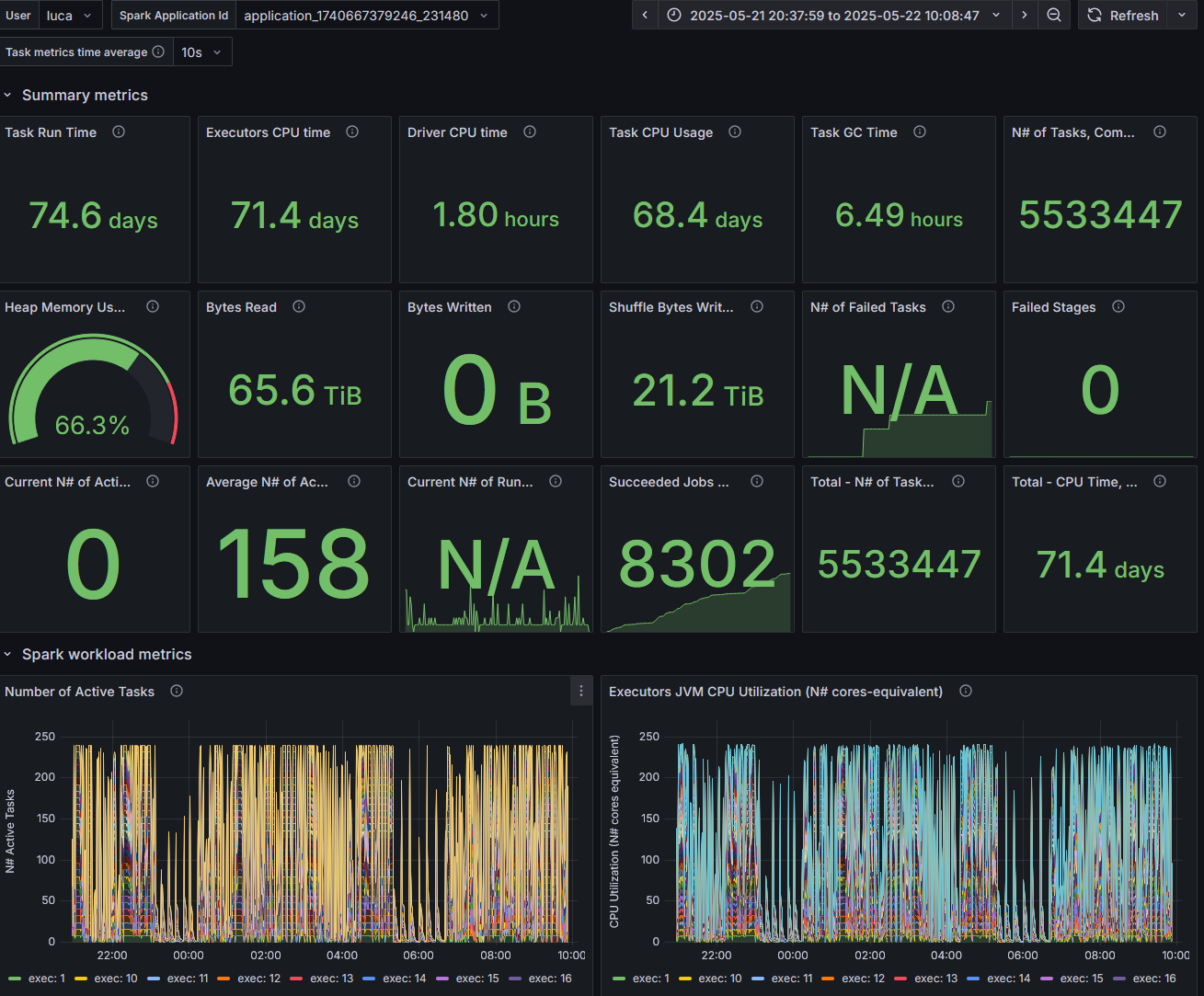
Figure 1: The graph illustrates the dynamic task allocation in a Spark application during a TPCDS 10TB benchmark on a YARN cluster with 256 cores. It showcases the variability in the number of active tasks over time, highlighting instances of execution "long tails" and straggler tasks, as seen in the periodic spikes and troughs.

How to Make the Best of Spark Metrics System

Understanding and utilizing Spark's metrics system is crucial for optimization:
  • Importance of Metrics: Metrics provide insights beyond simple timing, revealing details about task execution, resource utilization, and bottlenecks.

  • Execution Time is Not Enough: Measuring the execution time of a job (how long it took to run it), is useful, but it doesn’t show the whole picture. Say the job ran in 10 seconds. It's crucial to understand why it took 10 seconds instead of 100 seconds or just 1 second. What was slowing things down? Was it the CPU, data input/output, or something else, like data shuffling? This helps us identify the root causes of performance issues.

  • Key Metrics to Collect:
    • Executor Run Time: Total time executors spend processing tasks.
    • Executor CPU Time: Direct CPU time consumed by tasks.
    • JVM GC Time: Time spent in garbage collection, affecting performance.
    • Shuffle and I/O Metrics: Critical for understanding data movement and disk interactions.
    • Memory Metrics: Key for performance and troubleshooting Out Of Memory errors.

  • Metrics Analysis, what to look for:
    • Look for bottlenecks: are there resources that are the bottleneck? Are the jobs running mostly on CPU or waiting for I/O or spending a lot of time on Garbage Collection?
    • USE method: Utilization Saturation and Errors (USE) Method is a methodology for analyzing the performance of any system. 
      • The tools described here can help you to measure and understand Utilization and Saturation.
    • Can your job use a significant fraction of the available CPU cores? 
      • Examine the measurement of  the actual number of active tasks vs. time.
      • Figure 1 shows the number of active tasks measured while running TPCDS 10TB on a YARN cluster, with 256 cores allocated. The graph shows spikes and troughs.
      • Understand the root causes of the troughs using metrics and monitoring data. The reasons can be many: resource allocation, partition skew, straggler tasks, stage boundaries, etc.
    • Which tool should I use?
      • Start with using the Spark Web UI
      • Instrument your jobs with sparkMesure. This is recommended early in the application development, testing, and for Continuous Integration (CI) pipelines.
      • Observe your Spark application execution profile with Spark-Dashboard.
      • Use available tools with OS metrics too. See also Spark-Dashboard extended instrumentation: it collects and visualizes OS metrics (from cgroup statistics) like network stats, etc
    • Drill down:
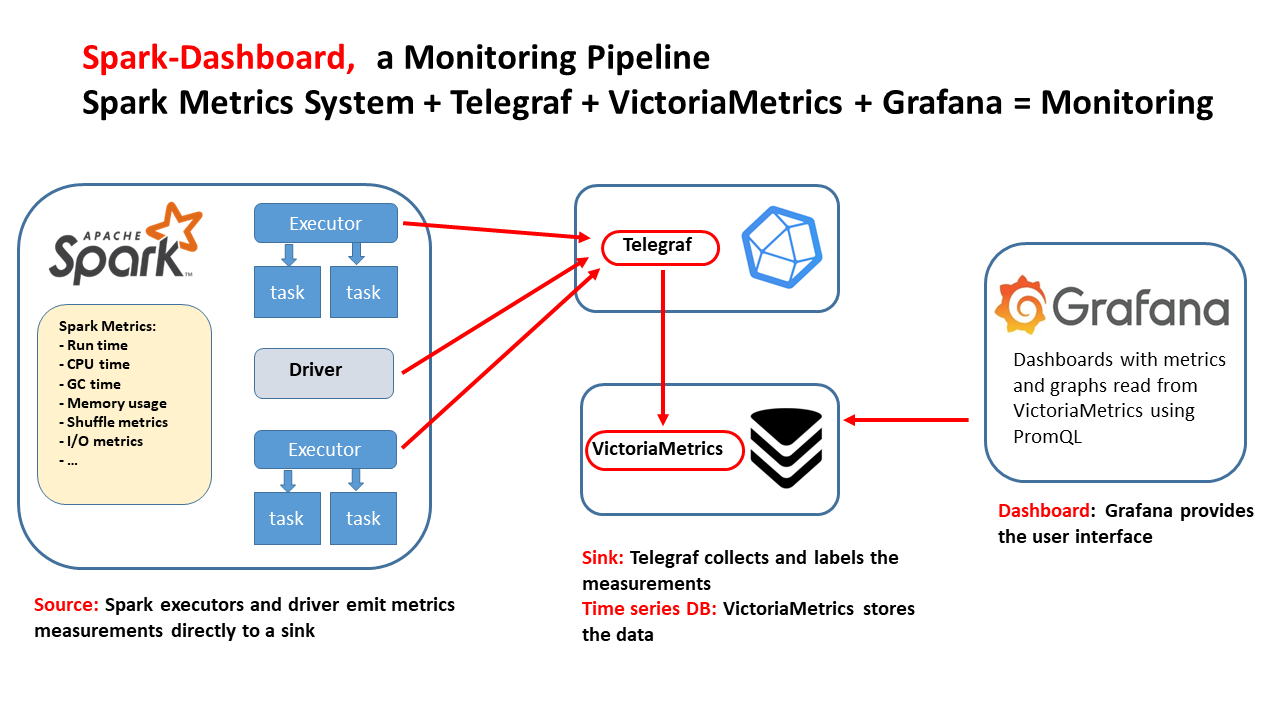
Figure 2: This technical drawing outlines the integrated monitoring pipeline for Apache Spark implemented by Spark-Dashboard using open-source components. The flow of the diagram illustrates the Spark metrics source and the components used to store and visualize the metrics.


Lessons Learned and Conclusions

From setting up and running a Spark Performance Lab, here are some key takeaways:

  • Collect, analyze and visualize metrics: Go beyond just measuring jobs' execution times to troubleshoot and fine-tune Spark performance effectively.
  • Use the Right Tools: Familiarize yourself with tools for performance measurement and monitoring.
  • Start Small, Scale Up: Begin with smaller datasets and configurations, then gradually scale to test larger, more complex scenarios.
  • Tuning is an Iterative Process: Experiment with different configurations, parallelism levels, and data partitioning strategies to find the best setup for your workload.

Establishing a Spark Performance Lab is a fundamental step for any data engineer aiming to master Spark's performance aspects. By integrating tools like Web UI, TPCDS_PySpark, sparkMeasure, and Spark-Dashboard, developers and data engineers can gain unprecedented insights into Spark operations and optimizations. 

Explore this lab setup to turn theory into expertise in managing and optimizing Apache Spark. Learn by doing and experimentation!

Acknowledgements: A special acknowledgment goes out to the teams behind the CERN data analytics, monitoring, and web notebook services, as well as the dedicated members of the ATLAS database group.


Wednesday, September 27, 2023

Enhancing Apache Spark Performance with Flame Graphs: A Practical Example Using Grafana Pyroscope

TL;DR Explore a step-by-step example of troubleshooting Apache Spark job performance using flame graph visualization and profiling. Discover the seamless integration of Grafana Pyroscope with Spark for streamlined data collection and visualization.


The Puzzle of the Slow Query

Set within the framework of data analysis for the ATLAS experiment's Data Control System, our exploration uses data stored in the Parquet format and deploys Apache Spark for queries. The setup: Jupyter notebooks operating on the SWAN service at CERN interfacing with the Hadoop and Spark service.

The Hiccup: A notably slow query during data analysis where two tables are joined. Running on 32 cores, this query takes 27 minutes—surprisingly long given the amount of data in play.

The tables involved:

  • EVENTHISTORY: A log of events for specific sub-detectors, each row contains a timestamp, the subsystem id and a value
  • LUMINOSITY, a table containing the details of time intervals called "luminosity blocks", see Luminosity block - Particle Wiki

Data size:
EVENTHISTORY is a large table, it can collect millions of data points per day, while LUMINOSITY is a much smaller table (only thousands of points per day). In the test case reported here we used data collected over 1 day, with EVENTHISTORY -> 75M records, and LUMINOSITY -> 2K records.


The join condition between EVENTHISTORY and LUMINOSITY is an expression used to match for events in EVENTHISORY and intervals in LUMINOSITY (note this is not a join based on an equality predicate). This is what the query looks like in SQL:


spark.sql("""
select l.LUMI_NUMBER, e.ELEMENT_ID, e.VALUE_NUMBER
from eventhistory e, luminosity l
where e.ts between l.starttime and l.endtime
""")


An alternative version of the same query written using the DataFrame API:

eventhistory_df.join(
    luminosity_df, 
    (eventhistory_df.ts >= luminosity_df.starttime) & 
    (eventhistory_df.ts <= luminosity_df.endtime)
    ).select(luminosity_df.LUMI_NUMBER,
             eventhistory_df.ELEMENT_ID,
             eventhistory_df.VALUE_NUMBER)


Cracking the Performance Case

WebUI: The first point of entry for troubleshooting this was the Spark WebUI. We could find there the execution time of the query (27 minutes) and details on the execution plan and SQL metrics under the "SQL/ DataFrame" tab. Figure 1 shows a relevant snippet where we could clearly see that Broadcast nested loop join was used for this.


Execution Plan: The execution plan is the one we wanted for this query, that is the small LUMINOSITY table is broadcasted to all the executors and then joined with each partition of the larger EVENTHISTORY table.


Figure 1: This shows a relevant snippet of the execution graph from the Spark WebUI. The slow query discussed in this post runs using broadcast nested loops join. This means that the small table is broadcasted to all the nodes and then joined to each partition of the larger table.


CPU utilization measured with Spark Dashboard

Spark Dashboard instrumentation provides a way to collect and visualize Spark execution metrics. This makes it easy to plot the CPU used during the SQL execution. From there we could see that  the workload was CPU-bound


The Clue: Profiling with Flame Graphs and Pyroscope

Stack profiling and Flame Graphs visualization are powerful techniques to investigate CPU-bound workloads. We use it here to find where the CPU cycles are consumed and thus make the query slow.

First a little recap of what is stack profiling with flame graph visualization, and what tools we can use to apply it to Apache Spark workloads:

Stack profiling and Flame Graphs visualization provide a powerful technique for troubleshooting CPU-bound workloads. 
  • Flame Graphs provide information on the "hot methods" consuming CPU
  • Flame Graphs and profiling can also be used to profile time spent waiting (off-cpu) and memory allocation

Grafana Pyroscope simplifies data collections and visualization, using agents and a custom WebUI. Key motivations for using it with Spark are:
  • Streamlined Data Collection & Visualization: The Pyroscope project page offers a simplified approach to data gathering and visualization with its custom WebUI and agent integration.
  • Java Integration: The Pyroscope java agent is tailored to work seamlessly with Spark. This integration shines especially when Spark is running on various clusters such as YARN, K8S, or standalone Spark clusters.
  • Correlation with Grafana: Grafana’s integration with Pyroscope lets you juxtapose metrics with other instruments, including the Spark metrics dashboard.
  • Proven Underlying Technology: For Java and Python, the tech essentials for collecting stack profiling data, async-profiler and py-spy, are time-tested and reliable.
  • Functional & Detailed WebUI: Pyroscope’s WebUI stands out with features that allow users to:
    • Select specific data periods
    • Store and display data across various measurements
    • Offer functionalities to contrast and differentiate measurements
    • Showcase collected data for all Spark executors, with an option to focus on individual executors or machines
  • Lightweight Data Acquisition: The Pyroscope java agent is efficient in data gathering. By default, stacks are sampled every 10 milliseconds and uploaded every 10 seconds. We did not observe any measurable  performance or stability impact of the instrumentation.

Spark Configuration


To use Pyroscope with Spark we used some additional configurations. Note this uses a specialized Spark Plugin from this repo. It is also possible to use java agents. The details are at:  

This is how we profiled and visualized the Flame Graph of the query execution:

1. Start Pyroscope
  • Download from https://github.com/grafana/pyroscope/releases
  • CLI start: ./pyroscope -server.http-listen-port 5040
  • Or use docker: docker run -it -p 5040:4040 grafana/pyroscope
  • Note: customize the port number, I used port 5040 to avoid confusion with the Spark WebUI which defaults to port 4040 too
2. Start Spark with custom configuration, as in this example with PySpark:

# Get the Spark session
from pyspark.sql import SparkSession
spark = (SparkSession.builder.
      appName("DCS analysis").master("yarn")
      .config("spark.jars.packages",
      "ch.cern.sparkmeasure:sparkplugins_2.12:0.3, io.pyroscope:agent:0.12.0")
      .config("spark.plugins", "ch.cern.PyroscopePlugin")
      .config("spark.pyroscope.server", "http://pyroscope_hostname:5040")
      .getOrCreate()
    )


Figure 2: This is a snapshot from the Grafana Pyroscope dashboard with data collected during the execution of the slow query (join between EVENTHISTORY and LUMINOSITY). The query runs in 27 minutes, using 32 cores. The Flame Graph shows the top executed methods and the Flame Graph. Notably, a large fraction of the execution time appears to be spent into SparkDateTimeUtils performing date-datatype conversion operations. This is a crucial finding for the rest of the troubleshooting and proposed fix.


The Insight  


Using profiling data from Pyroscope, we pinpointed the root cause of the query's sluggishness. Spark was expending excessive CPU cycles on data type conversion operations during the evaluation of the join predicate. Upon revisiting the WebUI and delving deeper into the execution plan under the SQL/DataFrame tab, we discovered, almost concealed in plain view, the specific step responsible for the heightened CPU consumption:

(9) BroadcastNestedLoopJoin [codegen id : 2]
Join condition: ((ts#1 >= cast(starttime_dec#57 as timestamp)) AND (ts#1 <= cast(endtime_dec#58 as timestamp)))

The extra operations of "cast to timestamp" appear to be key in explaining the issue.
Why do we have date format conversions? 
By inspecting the schema of the involved tables, it turns out that in the LUMINOSITY table the fields used for joining with the timestamp are of type Decimal.

To recap, profiling data, together with the execution plan, showed that the query was slow because it forced data type conversion over and over for each row where the join condition was evaluated.

The fix:  
The solution we applied for this was simple: we converted to use the same data type for all the columns involved in the join, in particular converting to timestamp the columns starttime and endtime of the LUMINOSITY table. 

Results: improved performance 70x:  
The results are that the query after the change runs in 23 sec, compared to the previous runtime of 27 minutes. Figure 3 shows the Flame graph after the fix was applied.


Figure 3: This is a snapshot of the Grafana Pyroscope dashboard with data collected during the execution of the query after tuning. The query takes only 23 seconds compared to 27 minutes before tuning (see Figure 2)

Related work and links

Details of how to use Pyroscope with Spark can be found in the note:  
Related work of interest for Apache Spark performance troubleshooting:
  • Spark Dashboard - tooling and configuration for deploying an Apache Spark Performance Dashboard using containers technology.
  • Spark Measure - a tool for performance troubleshooting of Apache Spark workloads. It simplifies the collection and analysis of Spark task and stage metrics data.
  • Spark Plugins - Code and examples of how to write and deploy Apache Spark Plugins.
  • Spark Notes and Performance Testing notes

Wrapping up

Wrapping Up: Stack profiling and Flame Graph visualization aren’t just jargon—they’re game-changers. Our deep dive illuminated how they transformed an Apache Spark query performance by 70x. Using Grafana Pyroscope with Spark, we demonstrated a holistic approach to gather, analyze, and leverage stack profile data.

A hearty thank you to my colleagues at CERN for their guidance. A special nod to the CERN data analytics, monitoring, and web notebook services, and to the ATLAS database team.

Friday, August 11, 2023

Performance Comparison of 5 JDKs on Apache Spark

Dive into a comprehensive load-testing exploration using Apache Spark with CPU-intensive workloads. This blog provides a comparative analysis of five distinct JDKs' performance under heavy-duty tasks generated through Spark. Discover a meticulous breakdown of our testing methodology, tools, and insightful results. Keep in mind, our observations primarily indicate the test toolkit and system's performance rather than offering a broad evaluation of the JDKs.

In this post, we'll also emphasize:

  • The rationale behind focusing on CPU and memory-intensive workloads, especially when handling large Parquet datasets.
  • The load testing tool's design: stressing CPU and memory bandwidth with large Parquet files.
  • Key findings from our tests, offering insights into variations across different JDKs.
  • Tools and methods employed for the most accurate measurements, ensuring our results are as reflective of real-world scenarios as possible.

Join us on this journey to decipher the intricate landscape of JDKs in the realm of Apache Spark performance!

On the load testing tool and instrumentation

What is being measured:

  • this is a microbenchmark of CPU and memory bandwidth, the tool is not intended to measure the performance of Spark SQL.
  • this follows the general ideas of active benchmarking: a load generator is used to produce CPU and memory-intensive load, while the load is measured with instrumentation.

Why testing with a CPU and memory-intensive workload:
In real life, the CPU and memory intensive workloads are often the most critical ones. In particular, when working with large datasets in Parquet format, the CPU and memory-intensive workloads are often the most critical ones. Moreover, workloads that include I/O time from object storage can introduce a lot of variability in the results that does not reflect the performance of Apache Spark but rather of the object storage system. Working on a single large machine also reduces the variability of the results and makes it easier to compare the performance of different test configurations.

The test kit:
The testing toolkit used for this exercise is described at test_Spark_CPU_memory.

  • The tool generates CPU and memory-intensive load, with a configurable number of concurrent workers.
  • It works by reading a large Parquet file. The test setup is such that the file is cached in the system memory therefore the tool mostly stresses CPU and memory bandwidth.

Instrumentation:
The workload is mostly CPU-bound, therefore the main metrics of interest are CPU time and elapsed time. Using sparkMeasure, we can also collect metrics on the Spark executors, notably the executors' cumulative elapsed time, CPU time, and time in garbage collection.

Workload data:
The test data used to generate the workload is a large Parquet table, store_sales, taken from the open source TPCDS benchmark. The size of the test data is 200 GB, and it is stored in multiple Parquet files. You can also use a subset of the files in case you want to scale down the benchmark. 
The files are cached in the filesystem cache, so that the test kit mostly stresses CPU and memory bandwidth (note, this requires 512GB of RAM on the test system, if you have less RAM, reduce the dataset size).

Download using download using: wget -r -np -nH --cut-dirs=2 -R "index.html*" -e robots=off https://sparkdltrigger.web.cern.ch/sparkdltrigger/TPCDS/store_sales.parquet

Test results:
Tests were run using the script spark_test_JDKs.sh that runs test_Spark_CPU_memory.py with different JDKs and prints out the results. The output of three different tests were collected and stored in txt files that can be found in the Data folder.

Test system:
A server with dual CPUS (AMD Zen 2 architecture), 16 physical cores each, 512 GB RAM, ~300 GB of storage space.

Spark configuration:
We use Apache Spark run in local mode (that is on a single machine, not scaling out on a cluster) for these tests, with 64GB of heap memory and 20 cores allocated to Spark. The large heap memory allocation is to reduce Garbage Collection overhead, which still fits in the available RAM.
The number of cores for Spark (that is the maximum number of concurrent tasks being executed by Spark) is set to 20, which brings the CPU load during the test execution to use about 60% of the physical cores, the workload keeps the CPUs busy with processing Parquet files, the rest of the CPU power is available for running other accessory load, notably Garbage collection activities, the OS and other processes.

Example performance test results:
This shows how you can use the toolkit to run the performance tests and collect performance measurements:

$ export JAVA_HOME=.... # Set the JDK that will be used by Spark
$ ./test_Spark_CPU_memory.py --num_workers 20 # Run the 3 tests using 20 concurrent workers (Spark cores)

Allocating a Spark session in local mode with 20 concurrent tasks
Heap memory size = 64g, data_path = ./store_sales.parquet
sparkmeasure_path = spark-measure_2.12-0.23.jar
Scheduling job number 1
Job finished, job_run_time (elapsed time) = 43.93 sec
...executors Run Time = 843.76 sec
...executors CPU Time = 800.18 sec
...executors jvmGC Time = 27.43 sec
Scheduling job number 2
Job finished, job_run_time (elapsed time) = 39.13 sec
...executors Run Time = 770.83 sec
...executors CPU Time = 755.55 sec
...executors jvmGC Time = 14.93 sec
Scheduling job number 3
Job finished, job_run_time (elapsed time) = 38.82 sec
...executors Run Time = 765.22 sec
...executors CPU Time = 751.68 sec
...executors jvmGC Time = 13.32 sec

Notes:
The elapsed time and the Run time decrease with each test run, in particular from the first to the second run we see a noticeable improvement, this is because various internal Spark structures are being "warmed up" and cached. In all cases, data is read from the Filesystem cache, except for the first warm-up runs that are discarded. Therefore, the test kit mostly stresses CPU and memory bandwidth. For the test results and comparisons, we will use the values measured at the 3rd run of each test and average over the available test results for each category.

JDK comparison tests

The following tests compare the performance of 5 different JDKs, running on Linux (CentOS 7.9), on a server with dual Zen 2 CPUs, 16 physical cores each, 512 GB RAM, 300 GB of storage space for the test data. The Apache Spark version is 3.5.0 the test kit is test_Spark_CPU_memory.py. The JDK tested are:

  • Adoptium jdk8u392-b08
  • Adoptium jdk-11.0.21+9
  • Adoptium jdk-17.0.9+9
  • Oracle jdk-17.0.9
  • Oracle graalvm-jdk-17.0.9+11.1

The openJDKs were downloaded from Adoptium Temurin JDK, the Oracle JDKs were downloaded from Oracle JDK.
The Adoptium Temurin OpenJDK are free to use (see website).

Notably, the Oracle download page also reports that the JDK binaries are available at no cost under the Oracle No-Fee Terms and Conditions, and the GraalVM Free Terms and Conditions, respectively, see Oracle's webpage for details.


Test results and measurements

Test results summarized in this table are from the test output files, see Data. The values reported here are taken from the test reports, measured at the 3rd run of each test, as the run time improves when running the tests a couple of times in a row (as internal structures and caches are warming up, for example), The results are further averaged over the available test results (6 test runs) and reported for each category.

JDK and Metric name OpenJDK Java 8 OpenJDK Java 11 OpenJDK Java 17 Oracle Java 17 GraalVM Java 17
JDK Adoptium jdk8u392-b08 Adoptium jdk-11.0.21+9 Adoptium jdk-11.0.21+9 Oracle jdk-17.0.9 Oracle graalvm-jdk-17.0.9+11.1
Elapsed time (sec) 45.4 39.3 42.0 41.9 34.1
Executors' cumulative
... run time (sec)
896.1 775.9 829.7 828.6 672.3
... CPU time (sec) 851.9 763.4 800.6 796.4 649.5
... Garbage Collection time (sec) 42.6 12.3 29.4 32.5 23.0


Performance data analysis

From the metrics and elapsed time measurements reported above, the key findings are:

  • Java 8 has the slowest elapsed time, Java 11 and 17 are about 10% faster than Java 8, GraalVM is about 25% faster than Java 8.
  • The workload is CPU bound.

The instrumentation metrics provide additional clues on understanding the workload and its performance:

  • Run time, reports the cumulative elapsed time for the executors
  • CPU time reports the cumulative time spent on CPU.
  • Garbage Collection Time is the time spent by the executors on JVM Garbage collection, and it is a subset of the "Run time" metric.
  • From the measured values (see table above) we can conclude that the executors spend most of the time running tasks "on CPU", with some time spent on Garbage collection
  • We can see some fluctuations on Garbage Collection time, with Java 8 having the longest GC time. Note that the algorithm G1GC was used in all the tests (its use is set
  • as a configuration by the load generation tool test_Spark_CPU_memory.py).
  • We can see the GraalVM 17 stands out as having the shortest Executors' runtime. We can speculate that is due to the GraalVM just-in-time compiler and the Native Image feature, which provide several optimizations compared to the standard HotSpot JVM (note, before running to install GraalVM for your Spark jobs, please note that there are other factors at play here, including that Native Image feature in an optional early adopter technology, see Oracle documentation for details).
  • Java 8 shows the worst performance in terms of run time and CPU time, and it also has the longest Garbage Collection time. This is not surprising as Java 8 is the oldest of the JDKs tested here, and it is known to have worse performance than newer JDKs.
  • Java 11 and Java 17 have similar performance, with Java 11 being a bit faster than Java 17 (of the order of 3% for this workload), at this stage it is not clear if there is a fundamental reason for this or the difference comes from measurement noise (see also the section on "sanity checks" and the comments there on errors in the metrics measurements).

Active benchmarking and sanity checks

The key idea of active benchmarking is that while the load testing tool is running, we also take several measurements and metrics using a variety of monitoring and measuring tools, for OS metrics and application-specific metrics. These measurements are used to complement the analysis results, provide sanity checks, and in general to help understand the performance of the system under test (why is the performance that we see what it is? why not higher/lower? Are there any bottlenecks or other issues/errors limiting the performance?).

Spark tools: the application-specific instrumentation used for these tests were the Spark WebUI and the instrumentation with sparkMeasure that allowed us to understand the workload as CPU-bound and to measure the CPU time and Garbage collection time.

Java FlameGraph: Link to a FlameGraph of the execution profile taken during a test run of test_Spark_CPU_memory.py. The FlameGraph shows that the workload is CPU-bound, and that the time is spent in the Spark SQL code, in particular in the Parquet reader. FlameGraphs are a visualization tool for profiling the performance of applications, see also Tools_FlameGraphs.md.

OS Tools: (see also OS monitoring tools): Another important aspect was to ensure that the data was cached in the filesystem cache, to avoid the overhead of reading from disk, for this tools like iostat and iotop were used to monitor the disk activity and ensure that the I/O on the system was minimal, therefore implying that data was read from the filesystem cache.
A more direct measurement was taken using cachestat, a tool that can be found in the perf-tools collection and bcc-tool, which allows measuring how many reads hit the filesystem cache, we could see that the hit rate was 100%, after the first couple of runs that populated the cache (and that were not taken in consideration for the test results).
CPU measurements were taken using top, htop, and vmstat to monitor the CPU usage and ensure that the CPUs were not saturated.

Other sanity checks: were about checking that the intended JDK was used in a given test, for that we used top and jps, for example.
Another important check is about the stability of the performance tests' measurements. We notice fluctuations in the execution time for different runs with the same parameters, for example. For this reason the load-testing tool is run on a local machine rather than a cluster, where these differences are amplified, moreover the tests are run multiple times, and the results reported are averages. We estimated the errors in the metrics measurements due to these fluctuations to be less than 3%, see also the raw test results reported available at Data.

Related work

The following references provide additional information on the topics covered in this note.

Conclusions

This blog post presents an exploration of load methodologies using Apache Spark and a custom CPU and memory-intensive testing toolkit. The focus is on comparing different JDKs and producing insights into their respective performance when running Apache Spark jobs under specific conditions (CPU and memory-intensive load when reading Parquet files). Upon evaluating Apache Spark's performance across different JDKs in CPU and memory-intensive tasks involving Parquet files, several key findings emerged:

  1. JDK's Impact: The chosen JDK affects performance, with significant differences observed among Java 8, 11, 17, and GraalVM.
  2. Evolution of JDKs: Newer JDK versions like Java 11 and 17 showcased better outcomes compared to Java 8. GraalVM, with its specific optimizations, also stood out.
  3. Developer Insights: Beyond personal preference, JDK selection can drive performance optimization. Regular software updates are essential.
  4. Limitations: Our results are based on specific test conditions. Real-world scenarios might differ, emphasizing the need for continuous benchmarking.
  5. Guidance for System Specialists: This study offers actionable insights for architects and administrators to enhance system configurations for Spark tasks.

In essence, the choice of JDK, coupled with the nature of the workload, plays a significant role in Apache Spark's efficiency. Continuous assessment is crucial to maintain optimal performance.


Acknowledgements

I would like to express my sincere gratitude to my colleagues at CERN for their invaluable assistance and insightful suggestions, in particular I'd like to acknowledge the CERN data analytics and web notebook services, and the ATLAS database and data engineering teams.


Friday, August 28, 2020

Apache Spark 3.0 Memory Monitoring Improvements

TLDR; Apache Spark 3.0 comes with many improvements, including new features for memory monitoring. This can help you troubleshooting memory usage and optimizing the memory configuration of your Spark jobs for better performance and stability, see SPARK-23429 and SPARK-27189.

The problem with memory
Memory is key for the performance and stability of Spark jobs. If you don't allocate enough memory for your Spark executors you are more likely to run into the much dreaded Java OOM (out of memory) errors or substantially degrade your jobs' performance. Memory is needed by Spark to execute efficiently Dataframe/RDD operations, and for improving the performance of algorithms that would otherwise have to swap to disk in their processing (e.g. shuffle operations), moreover, it can be used for caching data, reducing I/O. This is all good in theory, but in practice how do you know how much memory you need?

A basic solution
One first basic approach to memory sizing for Spark jobs, is to start by giving the executors ample amounts of memory, provided your systems has enough resources. For example, by setting the spark.executor.memory configuration parameter to several GBs. Note, in local mode you would set sprk.driver.memory instead. You can further tune the configuration by trial-and-error, by reducing and increasing memory with each test and observe the results. This approach may give good results quickly, but it is not a very solid approach to the problem.

A more structured approach to memory usage troubleshooting and to sizing memory for Spark jobs is to use monitoring data to understand how much memory is used by the Spark application, which jobs request more memory, and which memory areas are used, finally linking this back to the application details and in the context of other resources utilization (for example, CPU usage).
This approach helps with drilling down on issues of OOM, and also to be more precise in allocating memory for Spark applications, aiming at using just enough memory as needed, without wasting memory that can be a scarce shared resource in some systems. It is still an experimental and iterative process, but more informed than the basic trial-and-error solution.

How memory is allocated and used by Spark

Configuration of executor memory

The main configuration parameter used to request the allocation of executor memory is spark.executor.memory.Spark running on YARN, Kubernetes or Mesos, adds to that a memory overhead  to cover for additional memory usage (OS, redundancy, filesystem cache, off-heap allocations, etc), which is calculated as memory_overhead_factor * spark.executor.memory  (with a minimum of 384 MB). The overhead factor is 0.1 (10%), it can be configured when running on Kubernetes (only) using spark.kubernetes.memoryOverheadFactor.
When using PySpark additional memory can be allocated using spark.executor.pyspark.memory
Additional memory for off-heap allocation is configured using spark.memory.offHeap.size=<size> and spark.memory.offHeap.enabled=true. This works on YARN, for K8S, see SPARK-32661.  
Note also parameters for driver memory allocation: spark.driver.memory and spark.driver.memoryOverhead
Note: this covers recent versions of Spark at the time of this writing, notably Spark 3.0 and 2.4. See also Spark documentation.
  
Figure 1: Pictorial representation of the memory areas allocated and used by Spark executors and the main parameters for their configuration. 
  

Spark unified memory pool

Spark tasks allocate memory for execution and storage from the JVM heap of the executors using a unified memory pool managed by the Spark memory management systemUnified memory occupies by default 60% of the JVM heap: 0.6 * (spark.executor.memory - 300 MB). The factor 0.6 (60%) is the default value of the configuration parameter spark.memory.fraction. 300MB is a hard-coded value of "reserved memory". The rest of the memory is used for user data structures, internal metadata in Spark, and safeguarding against OOM errors. 
Spark manages execution and storage memory requests using the unified memory pool. When little execution memory is used, storage can acquire most of the available memory, and vice versa. Additional structure in the working of the storage and execution memory is exposed with the configuration parameter spark.memory.storageFraction (default is 0.5), which guarantees that the stored blocks will not be evicted from the unified memory by execution below the specified threshold.
The unified memory pool can optionally be allocated using off-heap memory, the relevant configuration parameters are: spark.memory.offHeap.size and spark.memory.offHeap.enabled
  

Opportunities for memory configuration settings

The first key configuration to get right is spark.executor.memory. Monitoring data (see the following paragraphs) can help you understand if you need to increase the memory allocated to Spark executors and or if you are already allocating plenty of memory and can consider reducing the memory footprint.
There are other memory-related configuration parameters that may need some adjustments for specific workloads: this can be analyzed and tested using memory monitoring data.
In particular, increasing spark.memory.fraction (default is 0.6) may be useful when deploying large Java heap, as there is a chance that you will not need to set aside 40% of the JVM heap for user memory. With similar reasoning, when using large Java heap allocation, manually setting spark.executor.memoryOverhead to a value lower than the default (0.1 * spark.executor.memory) can be tested.
  

Memory monitoring improvements in Spark 3.0

Two notable improvements in Spark 3.0 for memory monitoring are:
  • SPARK-23429: Add executor memory metrics to heartbeat and expose in executors REST API
    • see also the umbrella ticket SPARK-23206: Additional Memory Tuning Metrics
  • SPARK-27189: Add Executor metrics and memory usage instrumentation to the metrics system
When troubleshooting memory usage it is important to investigate how much memory was used as the workload progresses and measure peak values of memory usage. Peak values are particularly important, as this is where you get possible slow downs or even OOM errors. Spark 3.0 instrumentation adds monitoring data on the amount of memory used, drilling down on unified memory, and memory used by Python (when using PySpark). This is implemented using a new set of metrics called "executor metrics", and can be helpful for memory sizing and troubleshooting performance. 
    

Measuring memory usage and peak values using the REST API

An example of the data you can get from the REST API in Spark 3.0:

WebUI URL + /api/v1/applications/<application_id>/executors

Here below you can find a snippet of the peak executor memory metrics, sampled on a snapshot and limited to one of the executors used for testing:
"peakMemoryMetrics" : {
    "JVMHeapMemory" : 29487812552,
    "JVMOffHeapMemory" : 149957200,
    "OnHeapExecutionMemory" : 12458956272,
    "OffHeapExecutionMemory" : 0,
    "OnHeapStorageMemory" : 83578970,
    "OffHeapStorageMemory" : 0,
    "OnHeapUnifiedMemory" : 12540212490,
    "OffHeapUnifiedMemory" : 0,
    "DirectPoolMemory" : 66809076,
    "MappedPoolMemory" : 0,
    "ProcessTreeJVMVMemory" : 38084534272,
    "ProcessTreeJVMRSSMemory" : 36998328320,
    "ProcessTreePythonVMemory" : 0,
    "ProcessTreePythonRSSMemory" : 0,
    "ProcessTreeOtherVMemory" : 0,
    "ProcessTreeOtherRSSMemory" : 0,
    "MinorGCCount" : 561,
    "MinorGCTime" : 49918,
    "MajorGCCount" : 0,
    "MajorGCTime" : 0
  },

Notes:
  • Procfs metrics (SPARK-24958) provide a view on the process usage from "the OS point of observation".
    • Notably, procfs metrics provide a way to measure memory usage by Python, when using PySpark and in general other processes that may be spawned by Spark tasks.
  • Profs metrics are gathered conditionally:
    • if the /proc filesystem exists
    • if spark.executor.processTreeMetrics.enabled=true
    • The optional configuration spark.executor.metrics.pollingInterval allows to gather executor metrics at high frequency, see doc.
  • Additional improvements of the memory instrumentation via REST API (targeting Spark 3.1) are in "SPARK-23431 Expose the new executor memory metrics at the stage level".
  

Improvements to the Spark metrics system and Spark performance dashboard

The Spark metrics system based on the Dropwizard metrics library provides the data source to build a Spark performance dashboard. A dashboard naturally leads to time series visualization of Spark performance and workload metrics. Spark 3.0 instrumentation (SPARK-27189) hooks to the executor metrics data source and makes available the time series data with the evolution of memory usage. 
Some of the advantages of collecting metrics values and visualizing them with Grafana are:
  • The possibility to see the evolution of the metrics values in real time and to compare them with other key metrics of the workload. 
  • Metrics can be examined as aggregated values or drilled down at the executor level. This allows you to understand if there are outliers or stragglers.
  • It is possible to study the evolution of the metrics values with time and understand which part of the workload has generated certain spikes in a given metric, for example. It is also possible to annotate the dashboard graphs, as explained at this link, with details of query id, job id, and stage id.
Here are a few examples of dashboard graphs related to memory usage:


Figure 2: Graphs of memory-related  metrics collected and visualized using a Spark performance dashboard. Metrics reported in the figure are: Java heap memory, RSS memory, Execution memory, and Storage memory. The Grafana dashboard allows us to drill down on the metrics values per executor. These types of plots can be used to study the time evolution of key metrics.
  

What if you are using Spark 2.x?

Some monitoring features related to memory usage are already available in Spark 2.x and still useful in Spark 3.0:
  • Task metrics are available in the REST API and in the dropwizard-based metrics and provide information:
    • Garbage Collection time: when garbage collection takes a significant amount of time typically you want to investigate for the need for allocating more memory (or reducing memory usage).
    • Shuffle-related metrics: memory can prevent some shuffle operations with I/O to storage and be beneficial for performance.
    • Task peak execution memory metric.
  • The WebUI reports storage memory usage per executor.
  • Spark dropwizard-based metrics system provides a JVM source with memory-related utilization metrics.


Lab configuration:

When experimenting and trying to get a grasp for the many parameters related to memory and monitoring, I found it useful to set up a small test workload. Some notes on the setup I used:


bin/spark-shell --master yarn --num-executors 16 --executor-cores 8 \
--driver-memory 4g --executor-memory 32g \
--jars /home/luca/spark-sql-perf/target/scala-2.12/spark-sql-perf_2.12-0.5.1-SNAPSHOT.jar \
--conf spark.eventLog.enabled=false \
--conf spark.sql.shuffle.partitions=512 \
--conf spark.sql.autoBroadcastJoinThreshold=100000000 \
--conf spark.executor.processTreeMetrics.enabled=true
  
  
import com.databricks.spark.sql.perf.tpcds.TPCDSTables
val tables = new TPCDSTables(spark.sqlContext, "/home/luca/tpcds-kit/tools","1500")
tables.createTemporaryTables("/project/spark/TPCDS/tpcds_1500_parquet_1.10.1", "parquet")
val tpcds = new com.databricks.spark.sql.perf.tpcds.TPCDS(spark.sqlContext)
val experiment = tpcds.runExperiment(tpcds.tpcds2_4Queries)


Limitations and caveats

  • Spark metrics and instrumentation are still an area in active development. There is room for improvement both in their implementation and documentation. I found that some of the metrics may be difficult to understand or may present what looks like strange behaviors in some circumstances. In general, more testing and sharing experience between Spark users may be highly beneficial for further improving Spark instrumentation.
  • The tools and methods discussed here are based on metrics, they are reactive by nature, and suitable for troubleshooting and iterative experimentation.
  • This post is centered on  describing Spark 3.0 new features for memory monitoring and how you can experiment with them. A key piece left for future work is to show some real-world examples of troubleshooting using memory metrics and instrumentation.
  • For the scope of this post, we assume that the workload to troubleshoot is a black box and that we just want to try to optimize the memory allocation  and use. This post does not cover techniques to improve the memory footprint of Spark jobs, however, they are very important for correctly using Spark. Examples of techniques that are useful in this area are: implementing the correct partitioning scheme for the data and operations, reducing partition skew, using the appropriate join mechanisms, streamlining caching, and many others, covered elsewhere. 
  

References

Talks:
Spark documentation and blogs:

JIRAs:  SPARK-23206SPARK-23429 and SPARK-27189 contain most of the details of the improvements in Apache Spark discussed here.


Conclusions and acknowledgments

It is important to correctly size memory configurations for Spark applications. This improves performance, stability, and resource utilization in multi-tenant environments. Spark 3.0 has important improvements to memory monitoring instrumentation. The analysis of peak memory usage, and of memory use broken down by area and plotted as a function of time, provide important insights for troubleshooting OOM errors and for Spark job memory sizing.   
Many thanks to the Apache Spark community, and in particular the committers and reviewers who have helped with the improvements in SPARK-27189.
This work has been developed in the context of the data analytics services at CERN, many thanks to my colleagues for help and suggestions.